If you are reading this, you are about to begin your journey through our QBank. This experience has been designed to allow you to customize your learning and review, and also to focus on the weakest parts of your knowledge base. We have created this tool to allow you to learn, in addition to review for your exam. This experience is also perfect for practice development as you advance in your career and want to apply current concepts to your practice.
Before you jump right in and begin answering test questions, we suggest you take the following steps to familiarize yourself with the QBank, and set yourself up for success!
The Clinical Toolkit
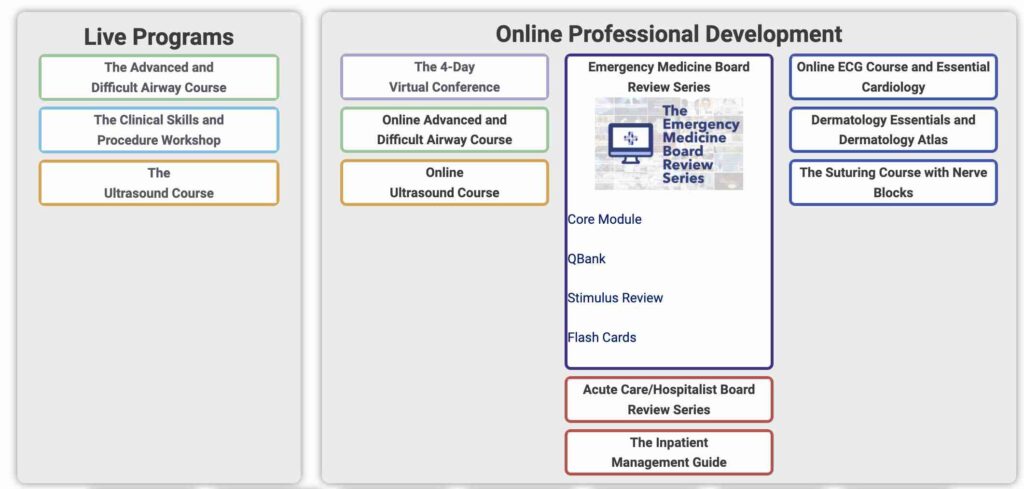
When you first log in to our website, you will encounter the Clinical Toolkit. This is the standard members-only page that all members of Provider Practice Essentials will see. The types and number of programs available depends on which programs you have purchased and enrolled for. Click on the name of the program you are using to see the content dropdown with that module.
Click on the dropdown content you with to access. For example, in the above picture, if you wanted to take the Emergency Medicine QBank, you would click on “Qbank”.
Use Your Dashboard
The Qbank Progress Dashboard
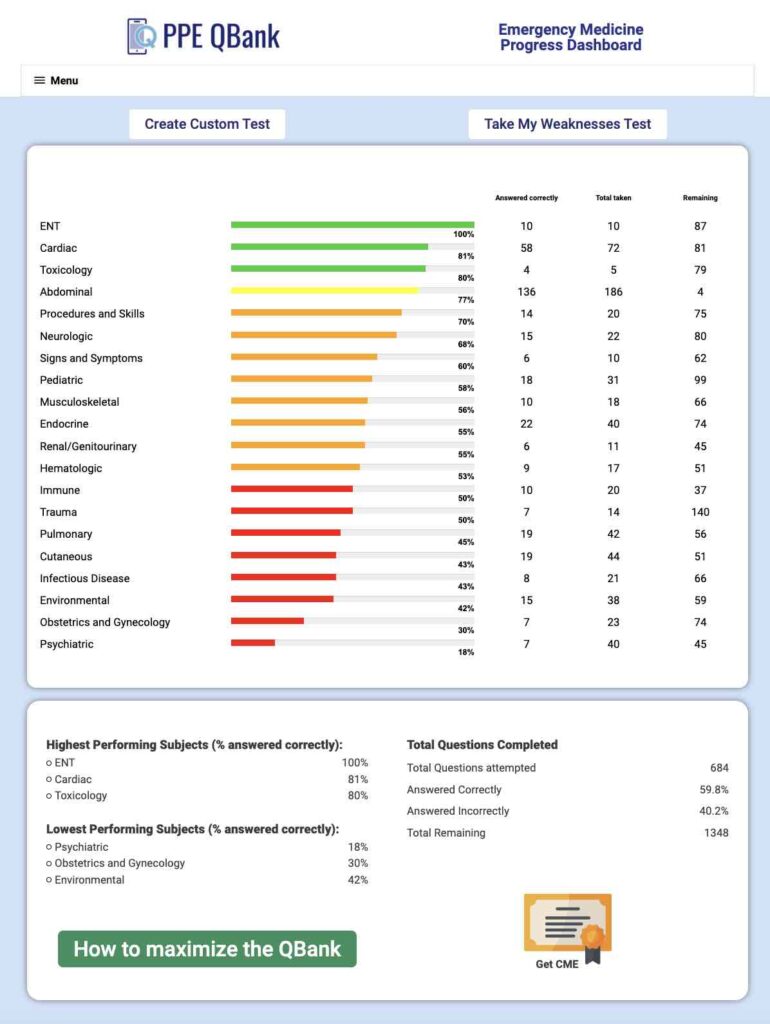
When you click the PPE Qbank button on the Review Dashboard, you will be taken to the Qbank Progress Dashboard. Notice that there are links for all of the other parts of the review series on the top of the screen.
You will notice several columns on your dashboard that display your personal data. Each question category is listed and ranked by the percentage of questions you have correctly answered. You will notice that before you take any practice tests, these categories are listed alphabetically. As you answer questions from each category, their ranking will change based on the number of questions you answer correctly. There will also be a bar graph next to each category that corresponds to the percentage you answer correctly. The more questions you answer from a specific category, the more accurately your performance will be ranked.
In addition to your category performance, you will easily be able to see your best and worst performing areas. We suggest you use this as a quick glance to see where you may want to focus. Finally, you will see a running total of the number of questions you have answered, the percentage you have answered correctly, and the total number of questions remaining in your QBank.
Once you have taken a question, it will be removed from the remaining questions you have available to answer. There is a menu on the top of your dashboard, where you will be able to launch any of the other board review products you have purchased.
Create Practice Tests
The PPE Qbank allows you to customize your testing experience to suit your individual needs. There are two types of tests available, both of which have a unique purpose. You can create tests by clicking on the buttons at the top of the dashboard.
Custom Test
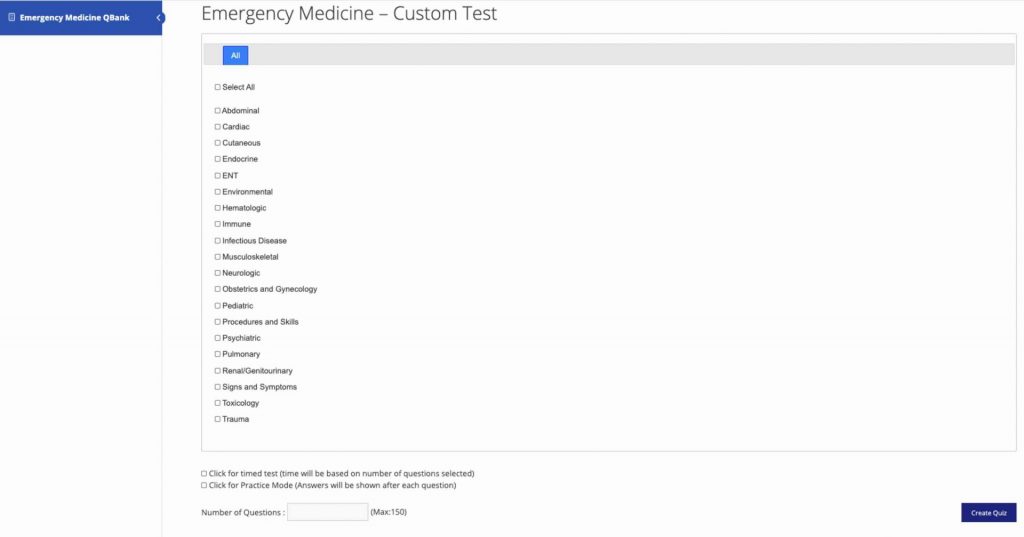
When you click the custom test button from the performance dashboard, you will be taken to the setup page. Simply select the categories you want to focus on for your quiz and choose the number of questions for each category. You will notice that the total number of questions appears at the bottom of your category list. You will be permitted to take a maximum of 150 questions per test.
Here are a few important things to remember when making a custom test:
1) Once you select a category, you need to enter the number of questions you want in the box next to it.
2) If you select all, you must enter a number next to that option. The questions will be evenly divided among the categories, but you will need a minimum of 1 question for each category.
3) If you encounter any problems making a quiz, go back to the dashboard and start again. You won’t lose any questions. Be sure to make your quizzes correctly next time!
My Weaknesses Test TM
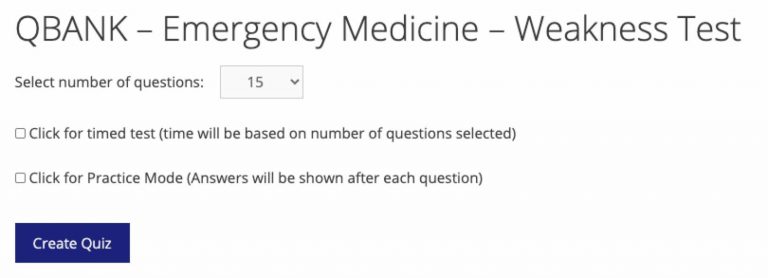
The My Weaknesses TM test will automatically create a 15, 30, or 45 question test that focuses only on your weakest categories. This will allow you to let the QBank work for you. As you answer more of these categories correctly, other categories will become your weakest areas, and additional tests will always concentrate on areas that you need to improve.
Please note that a weakness test cannot be completed until you have answered at least 1 question from each category (e.g. abdominal, cardiovascular, etc)
Other Options
In addition to the above choices, you will have the option to take your test in practice mode, or as a timed examination. Practice mode will show you the correct answer and the correct explanation before you see the next question. As you complete tests, the questions you have already taken will no longer be available for use. All questions from finished tests will be unavailable for future tests. You cannot answer the same question twice.
If you fail to answer 10% of the questions in any test correctly, you will not able to finish your test, and instead be prompted to re-take the practice test you created.
Question Icons
Clicking the flask icon brings up normal lab values for you to reference. This can be helpful if you are uncertain about a lab value as it pertains to a question.
The phone icon is a reporting link. If you have an issue or problem with a questions, click this link and a feedback form will pop up. Please complete the form and we will review the question.
What's The Best QBank Strategy?
Everyone studies differently, which is why we have included so many different ways to study in our review series! The Qbank is designed to expose you to questions in a board exam format. The ability to customize these allows you to arrange the review any way that you want. However, having studied for, taken, and passed literally hundreds of tests, our team has designed this to be as flexible as you want, while sticking to a proven review strategy.
The below recommendations are our suggestions to you to maximize this QBank as both a review and a learning tool.
1) Take a Baseline Test
We recommend beginning your QBank experience by taking a 50 question test that includes all topics. Simply select all while creating a custom test. This will give you a brief exposure to all subjects, and allow you to see where your areas of strength and weakness may be before you begin to study more and drill down your weaknesses. To truly maximize this system, we recommend you block off two hours and find a nice quiet place to take this baseline exam. Treat it as a real test to maximize your concentration.
2) Know the Blueprint for your Exam
Every accrediting agency has a blueprint for their exam content. This is basically the breakdown of the percentage of questions by category, and the commonly tested topics they typically include on their exams. While this is by no means all-inclusive, it serves as a good topic list to target your review. The ENP and PA-CAQ Blueprints can be found here:
The topics with the largest percentage of coverage on your test should be your primary focus. Look at the blueprint and identify the top three biggest percentage components of your test. For emergency medicine, as an example, you will probably have Cardiovascular, GI, and Pulmonary categories as the most commonly tested topics on your exam. We have built our tests around these percentages and you will have more questions available for these topics.
4) Begin Taking Regular Tests
Depending on your time until the exam, this can be done in several ways. Your testing frequency also depends on the other resources you are using to study. For example, if you are using a board review series with lectures, you may want to take a few questions after you have reviewed each topic. This reinforces what you reviewed in your lectures. Our Emergency Medicine Board Review Series Module includes additional topic-specific questions after each lecture category. We recommend completing the entire Board Review Series in tandem with the QBank, and taking short (10 question) QBank tests by category after each session of hearing lectures. These will reinforce what you listened to, and also give you exposure to future topics to look out for in your next lectures.
In general, we suggest taking 20-30 QBank questions daily, with a 50 question test every 5th day of studying. These basic tests should be 50% current study category, 25% weak category, and 25% other category. This will allow for 3-4 weeks of consistent test question exposure to varying topics. In addition, we recommend taking a 30 question Weakness Test every 6th day. This will automatically drill down your weakest areas and keep them in your mind!
5) Make Time for Your Final Review
When you approach the final 2-3 weeks before your exam, you should be taking 50-100 questions per day. We recommend creating these based on the blueprint for your exam, and choosing the correct number of questions per category based on your blueprint. This will keep your mind active and train you to expect the unexpected with each question. If time allows, and you have enough questions left over, we also suggest a few 15 question Weakness Tests in between, every couple of days. The last week before your exam should be spent reviewing your prior questions and answers, flashcards, and stimulus pictures. These high-yield easy review techniques will continue to reinforce the materials you learned elsewhere in our program. You should also review the notes you have taken during your review. If you used our program and took notes, these can be found in the topic lists for each module.
Review Answers
Once you have completed your test, you will have the option to review the questions you have taken. Doing so will let you see your answer and the correct answer. You will also be able to see an explanation of why the correct answer is right, and why the other answer choices are wrong. In addition, you will see graphic summary flashcards, and audio clips to allow you to listen to a deeper explanation of the topic.
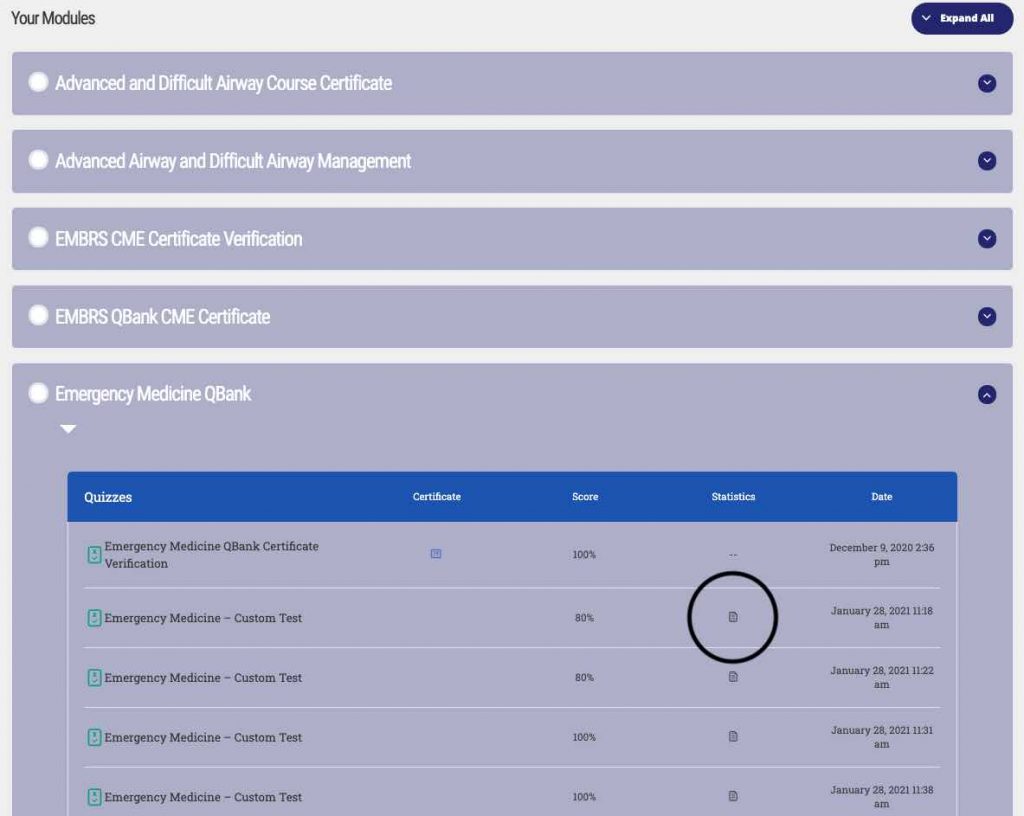
To access prior custom tests you have taken, simply scroll to the bottom of the qbank page. There you will find a list of all of the modules you have previously taken. You may also search for the name of the module you have taken to see your prior practice quizzes. For example, typing “Emergency” will display all quizzes related to Emergency Medicine.
Clicking on the notes icon in the “Statistics Column” will allow you to see the questions, answers, explanations, and audio for each prior test you have taken.
Have Fun!
Taking and passing your certification exam is a right of passage, and while it can be stressful, it doesn’t have to be! Be proud of the work you have accomplished, and take a break the night before your test! We hope your experience with this review series will be great, and we know you are more than ready to ace your exam! Good Luck!
Claim your CME Certificate
When you have completed all of the questions for your review, you can click on this button, which will allow you to take a brief survey and clam your CME credits for the PPE QBank. When you have finished the survey, you will receive a link to download your certificate. It will also be emailed to you on the email you have provided. You may only apply these credits one time, and application is based upon your username, which we will track and occasionally audit. We will submit your information to the accrediting agency for their filing and to ensure you are verified with their organization. Please keep your certificate in a safe place to ensure you have it for your records!
Toolkit Agreement
REGISTER FOR THE ONLINE SKILLS AND PROCEDURE WORKSHOP
* Designed for All Skill Levels * Basic and Advanced Suture techniques * Wound and Laceration Management * Complex laceration repair and special body parts * Other Skin Procedures
12 Category I CME Credits with additional credits for Emergency Procedures and Pharmacology
Includes our special INTERACTIVE advanced suturing trainer with specialized body parts and other procedures!
Includes ear, eyelid, finger, mouth, philtrum, lip, tongue, and nose repair.
Also includes cyst removal, abscess drainage, subungual hematoma removal, nail removal, running subcuticular, irregular (v, y, and x) lacerations, dog ear lacerations, and more.
* Designed for All Skill Levels * Basic and Advanced Suture techniques * Wound and Laceration Management * Complex laceration repair and special body parts * Other Skin Procedures
12 Category I CME Credits with additional credits for Emergency Procedures and Pharmacology
Includes our special advanced suturing trainer with specialized body parts and other procedures!
Program also includes coffee and beverage service throughout the day, and lunch.
Discounted hotel rooms are available at checkout for a limited time.